SysInfo Google Workspace Backup Tool
Securely back up and migrate Google Workspace mail, Drive, and Chat data across platforms with ease.
About
SysInfo Google Workspace Backup Tool is a desktop application for backing up and migrating Google Workspace data on Windows and Mac.
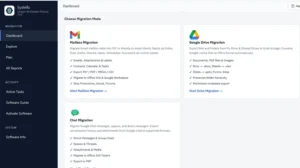
For Gmail, the tool can export mailbox data to PST, PDF, MBOX, or CSV. It also supports migration to Google Workspace, Microsoft 365, and Exchange Server. Emails, attachments, labels, folder hierarchy, contacts, calendars, tasks, and notes can be included where supported by the selected source and destination. Users can process a single mailbox or multiple accounts in a batch by importing CSV account details and using supported authentication methods.
Google Drive backup covers My Drive, Shared Drives, and Shared with Me content. Google Docs, Sheets, and Slides can be converted to corresponding Microsoft Office formats during supported migrations. The software is designed to preserve folder structure and file content while exporting data to a selected local destination or moving it to a supported cloud destination.
The tool also supports Google Chat migration and export. It can handle direct messages, group conversations, Spaces, channels, messages, shared files, attachments, and membership information, subject to the capabilities of the selected destination. Chat data can be saved as PDF in tabular, bubble-chat, or transcript layouts. Supported cloud destinations include another Google Workspace environment and Microsoft Teams.
CSV-based batch authentication and account mapping help administrators manage multiple users. Mapping options include one-to-one, one-to-many, many-to-one, and many-to-many transfers.
Filtering features allow users to select date ranges, Gmail categories, labels, Drive locations, and email fields such as sender, recipient, subject, CC, BCC, and body. Additional options include excluding selected folders or deleted items, saving attachments separately, handling duplicates, skipping previously migrated items, and resuming interrupted jobs from a checkpoint. Large PST or PDF exports can be split into smaller files.
The application processes backup and migration jobs locally and states that it does not store credentials or Workspace data on third-party servers. It uses Google APIs and Microsoft Graph APIs for supported operations, with OAuth 2.0, Domain-Wide Delegation, and encrypted TLS communication. Original source data is accessed in read-only mode and is not altered by the backup process.
Detailed job reports show completed, skipped, and failed items, along with error information for review and audit purposes. The software is available in Home, Administrator, Technician, and Enterprise editions. Version 26.08 was released on 5 August 2026 and is listed at 295 MB. It supports Windows and Mac systems; the stated minimum RAM is 4 GB, with 8 GB recommended. The trial version allows limited testing, including up to 500 emails per folder, 100 contacts and calendar events, 50 Chat messages per Space or direct message, and 20 MB of Drive data.
It is intended for mailbox protection, tenant consolidation, business restructuring, compliance archiving, and planned cloud-platform transitions.
Services Offered
- Google Workspace Backup and Recovery
- Google Workspace Email and Drive Migration
- Google Workspace Data Export and Archiving
Features

More businesses in Noida →
Payment Methods
Languages Spoken
Frequently Asked Questions
Can SysInfo Google Workspace Backup Tool migrate Gmail, Google Drive, and Google Chats data?
Yes, it supports backing up and migrating Gmail mailboxes, Google Drive files, and Google Chats data to supported local formats and cloud destinations, including Microsoft 365 and another Google Workspace account.
Related Listings in Noida