SysInfo OneDrive Duplicate File Finder
Find and Remove Duplicate Files from Personal and Business OneDrive Accounts
About
SysInfo OneDrive Duplicate File Finder helps users identify and remove duplicate files and folders from Personal and Business OneDrive accounts. It scans cloud storage to locate repeated data, making it easier to organize files and manage available space without manually downloading items. The software supports documents, photos, videos, audio files, archives, backups, shared files, and other formats.
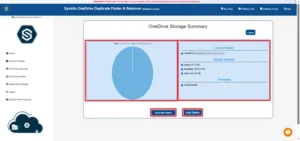
The tool scans OneDrive folders and displays detected duplicate items for review. Its Scan All Folders option lists folders for scanning, while Find All Duplicates identifies repeated files within selected folders. Users can preview a storage summary, including account details, timestamps, and used and available space, before managing duplicates. Users can review duplicate folders in one list before selecting items for removal from their account.
Duplicate detection uses file metadata and binary data. The software compares file fingerprints to determine whether files are identical, rather than relying only on names or visual similarity. Smart Grouping organizes detected duplicates by name, size, content, and file type. This helps users review matching items while keeping unique files unchanged.
After scanning, users can select duplicates to manage. The software provides two options: Delete Permanently or Move to Bin. Moving files to the OneDrive Bin allows restoration if needed, while permanent deletion removes them without the same recovery option. The Auto Delete feature can automatically remove detected duplicates, and selective removal lets users choose which items to delete.
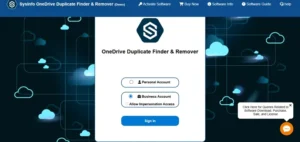
SysInfo OneDrive Duplicate File Finder works with Personal and Business OneDrive accounts. For business environments, Assign Impersonation enables an administrator to manage duplicate files across multiple OneDrive accounts, subject to required permissions. This helps organizations review and remove repeated data across accounts.
The software supports Word documents, PDFs, Excel spreadsheets, PowerPoint presentations, text files, images, audio, video, compressed files, and more. It helps reduce cloud storage clutter caused by repeated uploads, device synchronization, and duplicate copies of work files or media.
A free demo is available to scan and preview duplicate files. Its capabilities are limited to viewing detected duplicates; removing files and using Assign Impersonation require the full version. The product is offered in Home, Administrator, Technician, and Enterprise editions. Version 25.11 is listed at 157 MB. System requirements include an Intel Core 2 Duo E4600 2.40 GHz processor, 8 GB RAM (16 GB recommended), and 512 GB disk space. The product page lists compatibility with Windows 11, 10, 8.1, 8, 7, and Windows Server 2008 and 2012.
Services Offered
- OneDrive Duplicate File Detection and Removal
- Personal and Business OneDrive Storage Cleanup
- Bulk Duplicate File Management Across OneDrive Accounts
Features
More businesses in Noida →
Payment Methods
Languages Spoken
Frequently Asked Questions
Can I remove duplicate files from multiple OneDrive accounts simultaneously?
Yes, the software provides an Assign Impersonation feature that allows administrators to manage and remove duplicate files across multiple OneDrive Business accounts. It also supports Personal OneDrive accounts and provides options to delete duplicates permanently or move them to the Bin.